

Showing posts with label login. Show all posts

Wednesday, July 25, 2018

Advanced Toolbar — Superfly Menu Plugin Add-on (Download)


Premium WP plugins at Looks AwesomeFollow Looks Awesome on EnvatoFollow Looks Awesome on TwitterKnowledge Base Superfly Menu


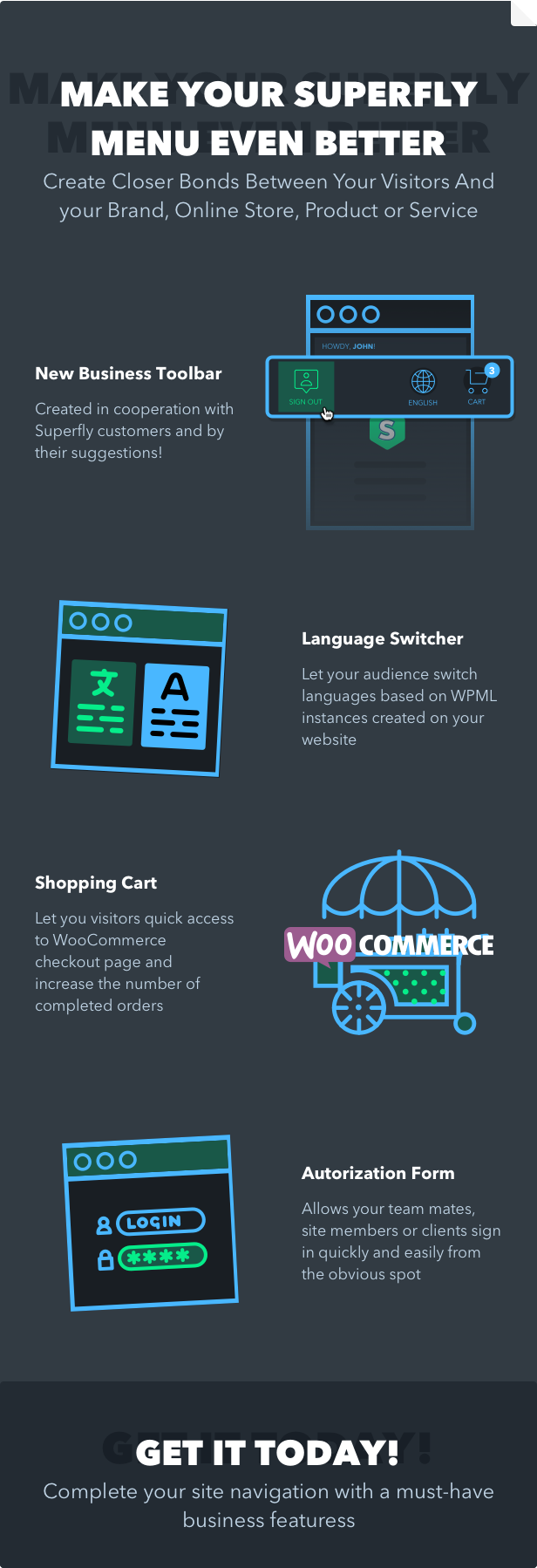
Advanced Toolbar is a premium plugin extension for Superfly menu, the best vertical WP menu plugin on the market. This add-on contains three the most popular features according to customer suggestions. You will get new customisable toolbar which you can supply with shopping cart, site language switcher, sign in/sign out form or own custom link. Advanced toolbar creates closer bonds between your audience and your brand supporting your business goals. Make your Superfly menu complete!


  • Site language switcher – based on WPML instances created on your website. No addition actions in plugin settings are required, it just works.


  • WooCommerce Shopping cart – creates visual indication of items added to the cart and provides quick access to checkout page.


  • Sign in/Sign out – provides quick and elegant way to sign in to your website. It’s also possible to provide a link for your custom form or any other page. in addition, say hello to your site members as WP does.

Don’t forget to check live demo page to get a feel how it works.


* This item is plugin extension. It requires Superfly – Responsive WP Menu Plugin v4.5+ to work. *


How it works


Install and activate the add-on as an ordinary WP plugin. After installation new tab Menu Panel / Toolbar appears on your Superfly admin page. On that tab, you will be able to setup and customise your new toolbar.


Requirements and Limitations


- PHP 5.3+
- jQuery 1.7+
- Superfly plugin v4.5+
- This add-on is not compatible with Navbar mode of Superfly menu at the moment.
- RTL is not supported currently.


Changelog


[1.0.3] Fix for "The plugin generated XXX characters of unexpected output..." error on some sites
[1.0.2] Removed PHP warnings
[1.0.1] Added registration link if it's allowed for anyone in WP settings
[1.0.0] Initial release


You may also like:


Price: $16
Sales: Total

Download Here

Wow Login - email and social login (Download)

Wow Login – WP plugin for easy login and registration of a user through a social network and email.


The Wow Login is the convenient WP plugin for secure registration and authorization on the site via various social networks or sending the link to the specified email. The extension provides users quick access to the personal cabinet and all the benefits of a web resource. It is an effective tool for the administrator, which allows you to create and expand the database of email addresses. It interacts with modern mailing services and makes it possible to export data in a convenient format.

Plugin advantages


The Wow Login plugin is easy to use and has flexible configuration. It allows you to get up-to-date information about new users, edit rights and restrictions for their accounts, update the database. Among the advantages of functional expansion:
  • convenient control panel and settings;

  • registration and authorization on the site via 4 social networks or email;

  • individual color selection for buttons and email input field;

  • detailed instructions to create and connect the API of each network for the administrator;

  • indication and detailed configuration of various information messages for output when a user sends email;

  • setting the default role for new users;

  • the ability to hide the admin bar and the “Login” button after authorization for individual roles;

  • editing the general style for the social button of the entrance;

  • adjustment of padding and margin between icon and text of the element;

  • adding borders and indicating the degree of rounding their corners;

  • setting the font size of the text and the social network logo;

  • disabling or selecting an option to display the icon – before or after the text;

  • external design of the data entry field when registering via email;

  • connection and automatic sending of a message to the resource administrator;

  • connection and automatic sending of a letter to the user after registration;

  • sending a message to the user when registering via an email address;

  • advanced editor to send messages and the ability to use template tags;

  • synchronization with 5 mailing platforms;

  • the ability to export the database in .csv and .xlsx formats for further use;

  • user redirection after registration to the landing page;

  • using shortcodes with settings on site pages or in posts.


Flexible customization of the buttons appearance and the field to input the email allows you to make the element visible to the web resource visitors. Besides insertion using a shortcode allows you to place it anywhere on the page.

Features


Using the Wow Login plugin simplifies the process of registering on the site and logging into the account. The administrator is able to classify users by categories with the assignment of appropriate access levels to them. The extension offers the large selection of tools:
  • create bright buttons for registration and entry to the site via 4 popular social networks: Facebook, Google, Twitter and LinkedIn. Follow the plugin’s recommendations and connect your API. Choose a unique color for the background, text, border, icon and backlight of each button;

  • set user alerts when registering on the site through an email. Use advanced editor functions to add and correct messages when interacting with the data entry field. Specify the text for the user if the registration was successful, an error occurred while sending the message, an incorrectly entered email address or a token;

  • flexible system of roles for authorized users. Set the role of the new registered user by default. Configure the visibility of the admin bar and the login button after authorization for each category manually;

  • general style settings for the social button. Set the padding, the margin between the icon and the name, the width of the border and the degree of rounding its corners, the size of the icon and the font of the text. Specify the features of displaying the element icon – hide its output, display after or before the button name;

  • customize the appearance of the email input field and the submit button. Edit the height and width of the elements, add a border, set the width for it and determine the degree of rounding its corners, set the font size. Select the color for the text to be entered, the border and the background of the field. Set the color for the background of the button and font, change the style of the item, when hovering the mouse;

  • add and configure automatic sending of a message to the site administrator. Specify the name of the recipient, the subject and the text of the letter. Enter the recipient’s email address in the special field. Use the multifunctional editor to design the message;

  • add and configure automatic sending of a message to the user after registration. Set the sender’s name and email address in the appropriate fields, add the subject and main content. Add to the letter various media files through an editor with advanced features, use available template tags;

  • configure the message when registering on the site via entering and sending an email address. Enter the name and mail of the recipient, the subject and content of the letter, add a link to complete the registration by the user;

  • integration of the plugin with 5 mail services. Use all the features of modern mailing services: MailChimp, GetResponse, ActiveCampaign, AWeber and SendinBlue. Synchronize the user database, track its relevance and frequency of updates;

  • add shortcodes to display the login button anywhere on the web page. Connect additional parameters for easy registration and authorization through social buttons on the site. Specify the required attribute “login” to select the input method. Via the “text” parameter set the name of the social button or a placeholder for the input field. Use “redirect” to redirect the user after authorizing the target page. The “button” parameter is used to add text to the login button by email;

  • built-in database of registered users. Track the addition of new users right in the control panel of the plugin, arrange the addresses according to the registration date. Copy and export the data in a convenient format.


When registering a new user via Wow Login, not only its current data is saved, but also a link to the profile in the social network. It simplifies the administrator’s work with segmentation of the database and the personification of the letters.

Can be used for:


  • social registration and authorization button on the site via Facebook;

  • authorization and login to private account via Google;

  • registration through a profile in Twitter;

  • quick access to the capabilities of the site via LinkedIn;

  • registration on the web resource through following the link received by email;

  • synchronize the address database with the mailing list services.

The Wow Login plugin is the functional tool for quick registration and login to the site. Installing the extension will allow the administrator to increase the conversion of the resource by increasing the number of new users. The solution will allow the page visitors to login easily into their account through social networks. It ensures the security of registration for the user and the receiving of up-to-date information for the administrator.


Price: $21
Sales: Total

7


Download Here

Free Mobile Verification Addon for UserPro (Download)

Price: $16
Sales: Total

19


Download Here

Tuesday, July 24, 2018

Login lightbox wordpress - easy login / register with facebook, buddypress and recapcha support (Download)

Looking for an easy way for your users to become members of your site ? Look no more because login box with facebook support has it all. Two click login, optional recapcha integration, even Buddypress extra register fields.


Easy setup

Just drag into your menu like any other menu item. Choose from login box, login button, or register button. All of these will summon the login box, but will go to login or register as requested.

Also can be integrated in content via shortcode.


Custom settings

.. for showing the login text. Choose style for account button, login button, register button. Each from the three predefined settings. Or add your own css easily if you have css knowledge.

Directory form Features


  • fully responsive – looks great from mobile to HD


  • six display modes skins – 3 times more display modes to show your listings then the average directory plugin


  • CSS3 technology - this player uses cutting-edge css3 definitions


  • easy install – purchase, download the zip, read the docs


  • iPhone / iPad optimized – this gallery has been optimized for Apple touch devices


  • Android optimized – this component has been tested on Android 4.0 and works awesome


  • developer / SASS powered – this component’s CSS has been built on top of SASS which means SASS users will have an easy time modifying the skins. For non-SASS users it’s no problem either because CSS files ( generated by SASS ) are provided


  • SEO friendly – built with search engine optimization on mind from the ground up


  • compatible with all major browsers, including IE – compatible from IE11+, Chrome, Safari and Firefox, Edge

Credits


Price: $13
Sales: Total

Download Here

Shared Login Security (Download)

SharedLogin Security is a handy WP plugin for allowing someone else to log in as any existing user in your WP admin panel, without sharing the credentials (that user’s username and password). It comes with some extremely useful features that will blow your mind away.


Let’s consider that you are using a third person (or a developer) to perform some development or maintenance or support tasks and need to share your username and password so that the support guy can log into your WP site and complete his tasks. Using SharedLogin you can generate a specialized url for that person and you don’t need to share your username and password with him anymore. You can even set how many times that person can login, or from which IP address he can login. Pretty sweet, eh?


Documentation: http://bit.ly/SharedLoginDoc


Features


  • Allow anyone to login as any user just by accessing URL

  • IP Address Restriction

  • Admin Menu Protection for logged in user via SharedLogin URL

  • Password protected urls

  • URLs can be set to expire after any number of usage

  • Comes with regular update and excellent documentation

  • Easy to use


Price: $20
Sales: Total

Download Here

WP Custom Admin Login - WordPress Plugin to make a customized admin login page (Download)

WP Custom Admin Login – WP plugin to make a customized admin login page


WP Custom Admin Login is a premium WP login page customization plugin that can be used to customize your default login page with the WP Customizer options. Packaged with 25+ beautifully pre-designed templates, the plugin offers lots of customization possibilities. With no coding skill, you can create an outstanding login page in no time. This fully customizer based plugin comes with intuitive interface that allows you to configure your admin login page as per your preference.


The plugin supports image/video background. It includes inbuilt Google reCaptcha version 2, inbuilt Social Login, 20+ social icons. WP Custom Admin Login is an ultimate plugin to customize your admin login page in a unique and stunning way.


Features Description


wp custom admin login feature list

Full Feature list


We have listed all the options available in the plugin.


  • Fully Customizer based plugin

  • Packed with 20+ awesome layouts

  • Full customization options with unlimited colors

  • Fully Documented with easy Configuration and video guidance.

  • Supports Image (Media Library) and Video (YouTube/Vimeo/MP4) background

  • Fully Responsive

  • Custom Titles / Texts and Logo

  • Customizable Back to link / Registration link / Logo link

  • In-built Google reCaptcha version 2

  • In-built Social Login (Facebook/Twitter/Google+)

  • Template feasible WYSIWYG containers

  • 20+ Social Icons

  • Custom CSS section

If you still have any queries you can drop us a comment and we will get back to you.


Try the Free Version First


You can download a copy of the plugin from the WP.org repository. Test it, play with it and check for compatibility with your theme.

Documentation


Please check our detailed documentation here.

Update Log


Please check our plugin update log here.

=== Version 1.0.0 ===
- initial release.


Lifetime Dedicated Support


- You can find us anytime when you have some queries, problems or with any valuable suggestions for plugin or us. You can find us through following ways:


Constant Free Upgrades


- Not fixed on dates, but we assure you to provide you new updates and feature upgrade in the plugin at regular basis.


Check out our other great plugins


Price: $19
Sales: Total

90


Download Here

BS Input - Social Login and Register Popup With Shortcode (Download)

Allow your site users to login or register to your site using their favorite social website accounts or using their mail address.


This plugin doesn’t require any coding knowledge or any theme modifying it will work out of the box with any theme and for extra control the plugin includes custom shortcode so you can place the form on custom page or in any widget area.

Features


  • Social integration with Facebook, Twitter, Google Plus, LinkedIn

  • Working with any WP theme without code modifying

  • Performance optimized with caching social login, register links

  • Supports WooCommerce, BuddyPress

  • Custom Shortcode for login, register forms

  • 2 Different styles for the social buttons

  • Unlimited color options

  • More than 6 animations for the popup model

  • Built-in translation system

  • Custom option to add unlimited links for logged in users

  • Custom option to enable or disable Font Awesome integration

2.0.1


Added: WPML Compatibility
Added: New option to append the login links before menu items
Improvment: Login shortcode for logged in users

2.0.0


Added: Google ReCAPTCHA V2 for login and register forms
Added: New option for ReCAPTCHA theme
Added: New option for redirect url after social register
Added: New option for redirect url when logging out
Added: New option to show posts content for logged in users only
Added: New option to show custom number of words for none logged users
Added: New shortcode for restricted content
Added: New shortcode for login/register buttons
Added: New options to style restirect content message colors and style
Added: New option for translation restricted content message
Added: New link to show woocommerce orders list for logged in users
Fixed: Missing translations inputs
Improvement: Plugin performance by caching social login links and only generate them once page finish load
Improvement: Plugin shortcode style for logged in users

1.1.2


Added: New section for plugin translation
Added: New option for logged in users links

1.1.0


Updated: Facebook SDK to fix the login with Facebook error
Added: Option to enable or disable the model window animation
Added: Option to select the model window animation effect
Minor CSS changes to plugin style
Minor JavaScript changes to the model window popup.

1.0.2


Fixed: Fontawesome disable option

1.0.1


Added: bb Support


Price: $18
Sales: Total

27


Download Here

Monday, July 23, 2018

Spider XING login (Download)

Price: $10
Sales: Total

0


Download Here

Site Defender (Download)

Inspired by Steam, Site Defender adds an extra layer of security to your WP website. Every login is tracked, and if a user logs in from an unknown IP address, the login is held until they provide a verification key which has been sent to them.


What else would you like to see in a plugin like this? Let me know in the comments section!


Price: $26
Sales: Total

0


Download Here